
Get paid: connect Stripe and choose your plan
Card payments land straight in your account with no screenshots to chase. Here's how payment setup works and how to pick your plan.
4 min readUpdated August 2026MyCakeShed takes card payments through Stripe, a trusted payments provider. Customers pay securely when they order, and the money is paid out to your bank — no payment screenshots to chase and no wondering whether someone actually paid.
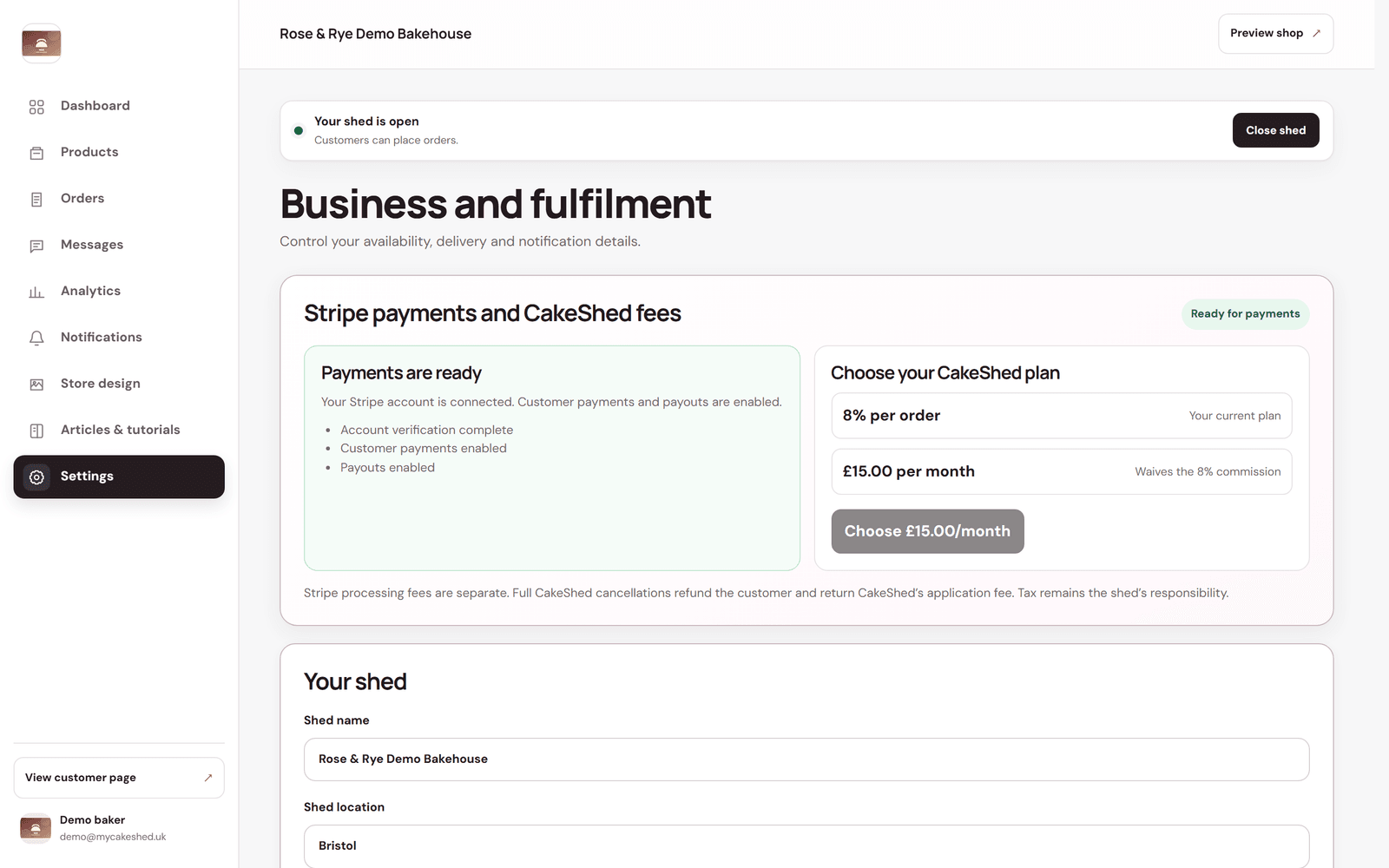
Connect your account
Open Settings and find the payments panel at the top. Follow the prompts to connect your Stripe account — you'll confirm a few business and bank details with Stripe directly. Once it shows account verification complete, customer payments enabled and payouts enabled, you're ready to take orders.
Choose your plan
- Pay-as-you-go — a small percentage of each order. Nothing to pay when you're not selling, which suits new or seasonal sheds.
- Monthly — a flat monthly fee that waives the per-order commission. This works out cheaper once you're taking regular orders.
Card processing fees from Stripe are separate and come out of each payment automatically. You can see exactly how a sale splits between your payout, the MyCakeShed fee and processing in Analytics under “Where the money goes”.
Start on pay-as-you-go and switch to the monthly plan once your regular orders make the flat fee the cheaper option — the dashboard numbers will make the tipping point obvious.