A tour of your baker dashboard
Your dashboard is home base. Here's what every part of it does — opening your shed, sharing your shop, and seeing what needs baking next.
4 min readUpdated August 2026When you sign in, the Dashboard is the first thing you see. It's designed to answer three questions at a glance: is my shop open, what needs my attention, and how do customers find me. Everything else lives one tap away in the left-hand menu.
Open or close your shed
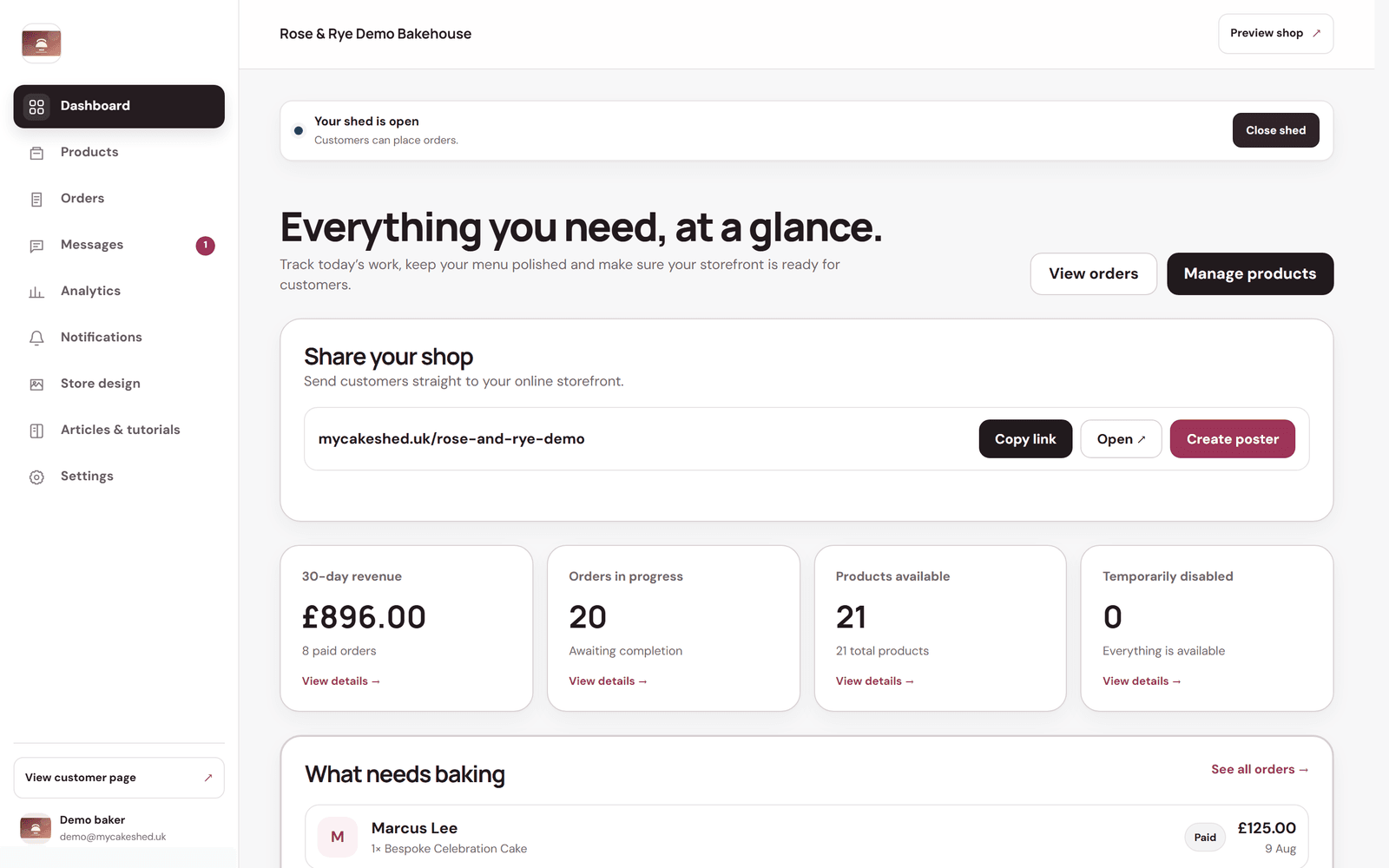
The bar at the top shows whether your shed is open or closed. When it's open, customers can place orders; when it's closed, your storefront still shows your menu but nobody can check out. Use the Open shed / Close shed button whenever you need to pause — a holiday, a fully booked weekend, or simply time off.
Share your shop
- Find the "Share your shop" panel — it shows your storefront link (your shop's web address).
- Use "Copy link" to paste it into your Instagram bio, a Facebook post, your WhatsApp status or a message.
- Use "Create poster" to generate a printable, QR-coded poster for your shed or a local noticeboard.
- Use "Open" to view your shop exactly as a customer sees it.
Read your at-a-glance numbers
- 30-day revenue — what you've taken in paid orders over the last month.
- Orders in progress — orders you've accepted that still need baking or fulfilling.
- Products available — how many items are live on your storefront.
- Temporarily disabled — products you've hidden from ordering (so you can spot anything you meant to switch back on).
Lower down, "What needs baking" lists the orders that need your attention soonest, so you can jump straight from the dashboard into the work.
Use "Preview shop" (top right) regularly. Seeing your storefront through a customer's eyes is the fastest way to catch a missing photo, an old price or a shop left closed by accident.